One question at a time. One tap each.

It reads what comes in, recommends the next move and does it when you tap.

Watch it in 36 seconds
  1. How The Block Runway works. More than email: six things it does in a day.
  2. The Block Runway plans your day. Tasks, meetings and a morning brief, in order.
  3. Decide with one tap. The facts come with it. The follow-up is done for you.
  4. Wingman helps in your meetings. What you need shows up while you talk.
  5. Work keeps moving while you're busy. See what is running and when it will be done.
  6. The Block Runway finds ways to grow. Each idea comes with a plan. Say go and it starts.
  7. The Block Runway learns how you work. Tell it once. It remembers.
  8. AI asks. You tap. Done.

How The Block Runway works, a 36 second film. Sample data.

Real screens, sample data.

More done. Every call still yours.

You tap an answer. The Block Runway does the work.

Outcomes

1 of 6

Decisions in a tap

Each question comes with a recommended answer.

Recommended answer

  • The facts come with it, linked to where they came from.
  • Take the recommended answer, pick another or tap Not now.
  • Each answer says what happens next, then it's done.
Real screens, sample data.

Watch the whole film
  1. How The Block Runway works. More than email: six things it does in a day.
  2. The Block Runway plans your day. Tasks, meetings and a morning brief, in order.
  3. Decide with one tap. The facts come with it. The follow-up is done for you.
  4. Wingman helps in your meetings. What you need shows up while you talk.
  5. Work keeps moving while you're busy. See what is running and when it will be done.
  6. The Block Runway finds ways to grow. Each idea comes with a plan. Say go and it starts.
  7. The Block Runway learns how you work. Tell it once. It remembers.
  8. AI asks. You tap. Done.

How The Block Runway works, a 36 second film. Sample data.

More of what you get

Grouped by where it helps.

Customers and replies
  • Sent from your own inbox

    Customers see your name and address. Their replies come back to you.

  • Your email becomes questions

    Connect Gmail or Microsoft 365 once.

  • The facts that matter, marked

    Key facts are highlighted, with a screenshot when it helps.

  • Posts approved before they publish

    A person in your workspace approves each social post first.

Your site and growth
  • Changes tested first

    A failed check stops a change before it goes live.

  • Seen in search and AI answers

    See how you show up in search and in AI answers.

  • Three ideas a week

    Brainstorm suggests three next moves from what your workspace knows.

  • A plan for growth

    Research becomes positioning, channels and campaigns in one plan.

Built around how you work
  • Software made for your business

    Dynamic websites, web apps and internal tools, built around the way you work.

  • Click through it first

    Open a working preview full screen and ask for changes.

  • Your look on every page

    Your logo, colours and approved examples guide every page and post.

  • Room to keep improving

    Feedback, past changes and the current version stay together.

Bigger work, planned
  • A big priority becomes a plan

    Tasks with clear criteria, dependencies and the role each one needs.

  • A cost limit on bigger work

    It can't grow past what you funded.

  • Experts when it needs judgment

    Qualified people pick up funded work from the marketplace.

  • Several jobs at once

    One long job never holds up the rest.

Your data, safe and current
  • Current numbers on every answer

    Connected tools sync on a schedule.

  • Money answers from real numbers

    With your bank or books connected, answers start from real figures.

  • A backup if an AI service fails

    If one AI company has trouble, another picks up.

  • Your files stay private

    Uploads go to private storage, never a public link.

  • Sign in with a passkey

    Use a passkey instead of a password.

Step by step

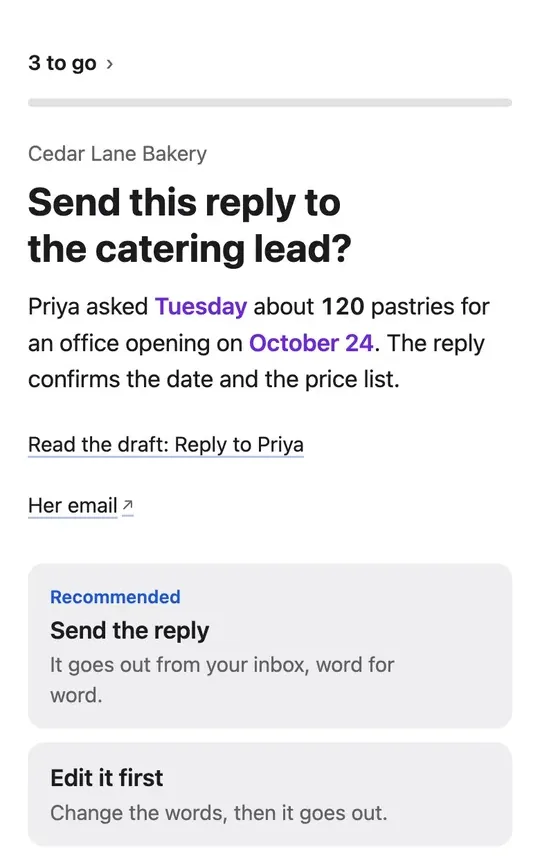
  1. What needs you becomes a question

    Connect your inbox, calendar, files, ads and payments once. What needs a decision comes to you as a question.

    A question for a sample bakery: send the drafted reply to a catering lead? The facts are marked, with links to the draft and her email, and a recommended answer.
  2. A reply in your tone

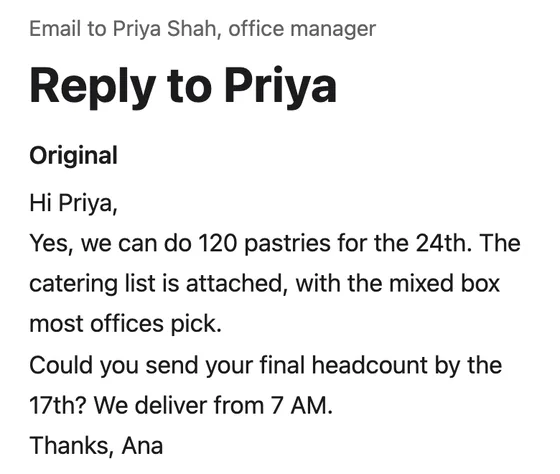
    Your greeting, your length, your sign-off. Read every word before it goes.

    A sample bakery's draft reply to a catering request, signed the way the owner signs.
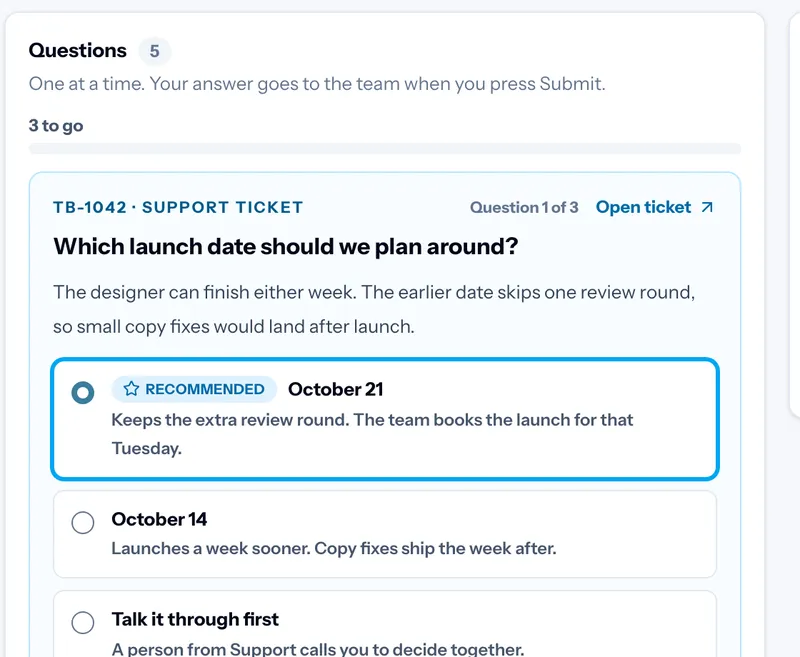
  3. You decide in a tap

    Take the recommended answer, pick another or write your own. Sometimes the answer is to do nothing.

    The Block Runway dashboard with a question and its recommended answer.
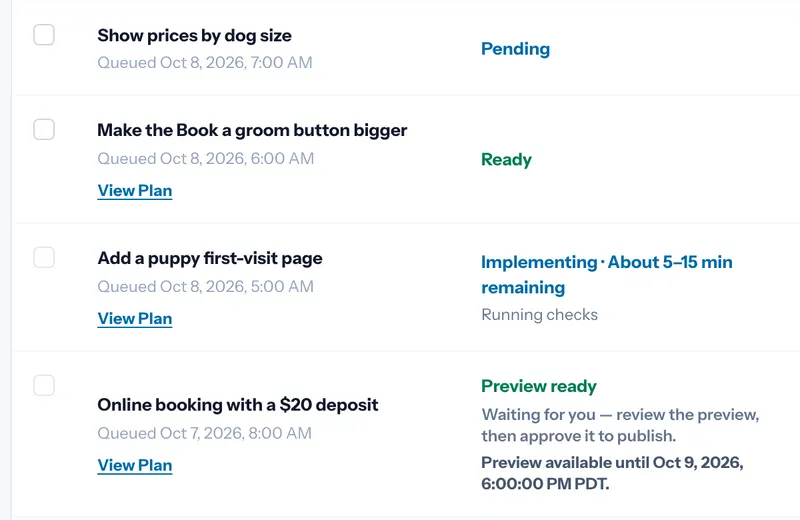
  4. Done, with a preview first

    Replies go from your own inbox. Site changes are tested, then shown to you before they go live.

    A list of website changes, one with its preview ready and waiting for approval.
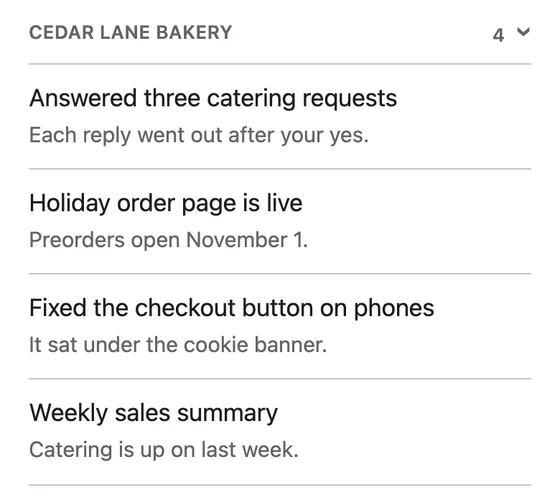
  5. One list of what got done

    Finished work lands on one list.

    A sample bakery's list of finished work: three catering replies sent, a holiday order page live, a checkout fix and a weekly sales summary.
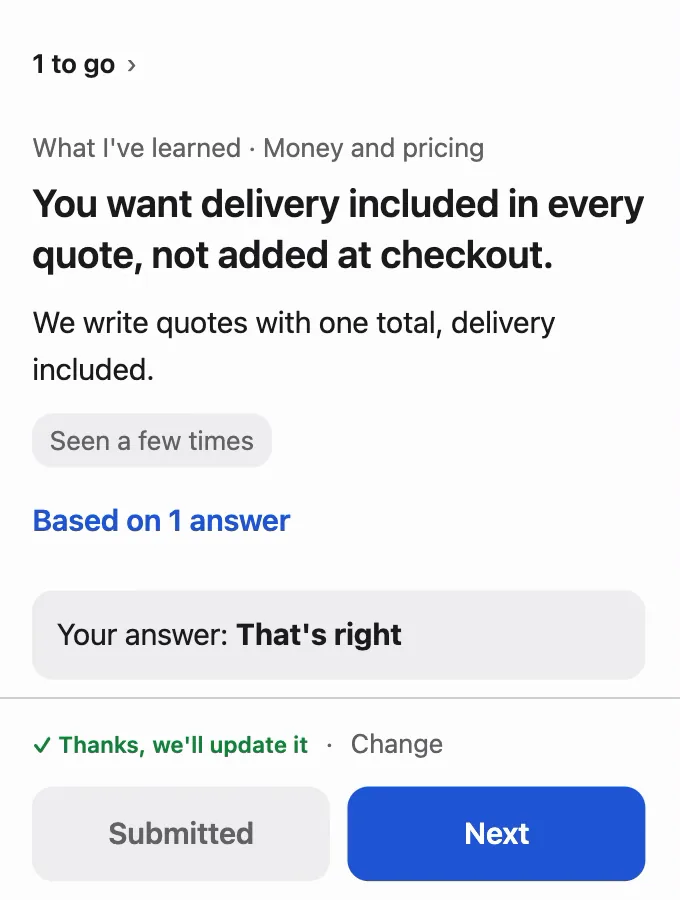
  6. It learns how you decide

    Each answer teaches its Brain a habit. It checks with you, then remembers.

    The Block Runway on a phone checking what it learned: the sample shop wants delivery included in every quote. The answer given: That's right.

You stay in control

  • Nothing is sent or spent without your yes.
  • A fixed rule, not the AI, checks for that yes.
  • A person from The Block reviews the big calls.
  • Every question links to where it came from.
  • Edit any draft before it goes.
  • Bigger work has a cost limit you fund.
  • Payment and bank connections only read. They can't move money.
  • Disconnect any tool at any time.

How it differs from an AI assistant

An assistant waits for your prompt. The Block Runway starts from what comes in.

Where work startsYour inbox, calls and tickets.Your prompt or goal.
Before anything goes outA fixed rule checks for your yes.Its settings, or an AI check, decide when to ask.
Who does the workThe Block, with qualified people when it needs judgment.The AI, on its own.

If you'd rather write prompts and check each result, an assistant fits better.

Questions

Do I have to write prompts?

No. It reads what comes in and asks you. You can add a note to any answer.

What if none of the options fit?

Write your own. It learns from that too.

Who does the work after my yes?

The Block's agents and people. Bigger work becomes a plan with a budget you fund, done by qualified people.

Which tools can I connect?

Your inbox, calendar, files, ads and payments. Your Connections page lists what your workspace can connect.

Can it get things wrong?

Yes, so it asks first. Each question shows the facts and the source. Nothing goes out without your yes.

What does it cost?

It depends on how it runs and which tools you connect. The pricing page shows your estimate.